
DocAcquire API Reference
Welcome to the DocAcquire API Reference
Unlock the power of intelligent document processing with the DocAcquire API. Our robust, AI-powered platform is engineered to streamline your document workflows, enabling seamless data extraction, classification, and validation. Whether you're dealing with invoices, contracts, or any other document type, DocAcquire provides the tools you need to automate your operations and gain valuable insights from your data.
This comprehensive guide will walk you through integrating DocAcquire's capabilities into your applications, from initial authentication to advanced document processing and retrieval.
Getting Started
Response Formats: All API responses from DocAcquire are consistently delivered in JSON format, ensuring easy parsing and integration with your systems.
Authentication: DocAcquire utilizes the industry-standard OAuth2 protocol for
secure API access. To make requests, you will first need to obtain an access token, which must be included
as a Bearer token in the Authorization header of all subsequent API calls.
DocAcquire Service Base URLs
Depending on your geographical region, please use the appropriate base URL for your API requests:
| Region | Base URL |
|---|---|
| US, UK | https://appservices.docacquire.com |
| Middle East | https://uae-docacquire-web-api.azurewebsites.net |
Example Request Header:
headers = {
            'Authorization': 'Bearer YOUR_ACCESS_TOKEN',
            'Content-Type': 'multipart/form-data',
            'Accept': 'application/json'
          }
Ready to explore? This guide provides detailed steps and examples for each API endpoint. Dive in to see how DocAcquire can transform your document processing workflows.
Service Limits
Two types of limits can affect your service usage. These limits govern how service should be consumed to deliver a better processing experience. Some of these rules are Hard (can't be changed) and some of them can be changed. As a consumer, you must test your integration thoroughly to adhere to/respect the following service limits.
Important Note: Intentionally abusing service limits may result in revoking your service access permanently and without prior notice.
| Limit | Description | Hard |
|---|---|---|
| Accepted File formats | JPEG, JPG, PNG, PDF, TIFF | Yes |
| File Size Limits | 20 MBs | Yes |
| Page Size Limit | A document with 10 pages - this is configurable. Please contact support if your requirement demands a higher number. | No |
| Min. Polling Interval | There should be a delay of at least 5 Minutes when polling endpoints for extracted data. | Yes |
| Max. files that can be uploaded in a batch - synchronously | 1 | Yes |
| Max. files that can be uploaded in a batch - asynchronously | 10 | Yes |
| Throttling on document upload - Asynchronous | At least a 30-second delay after every upload call. This is true when you upload documents using asynchronous processing. | Yes |
| Throttling on file upload - Synchronous | At least a 2-second delay after every call. This is true when you upload documents using synchronous processing. | Yes |
| Queue Processing Agents | A single capture agent is available to process documents in the queue. Each agent processes 3 documents in parallel. | Yes |
| Queue Limit | At any instance, you should not have more than 300 documents in the queue with the status of QUEUED, PROCESSING & FAILED. | Yes |
| Parallel Processing | You must avoid making parallel service calls, such as using a multithreading approach. | Yes |
| PDF Specific Limits | No support for password-protected PDFs | Yes |
| Languages | English, French, German, Italian, Portuguese and Spanish | Yes |
| Character Type | DocAcquire supports both handwritten and printed character recognition. | Yes |
This guide provides steps to use the DocAcquire API effectively. Explore topics on the left for details. It assumes your document type is set up, required fields are added, and configuration is complete. If not, see the Document Type Setup Guide for instructions.
1. Authentication
The first step in using the DocAcquire API is to authenticate using OAuth2 to obtain an access token, which is required for all subsequent API requests. The access token expires after 3 hours.
Obtaining an Access Token
Endpoint: /oauth/token
Method: POST
Payload:
{
    "username": "joebloggs@xyz.com",
    "password": "YourPassword"
}
cURL Example:
curl --request POST \
     --url {BASE_URL}/oauth/token \
     --header 'accept: application/json' \
     --header 'content-type: application/json' \
     --data '
{
  "username": "your_username",
  "password": "your_password"
}'
Sample Response (200 - Success):
{
    "accessToken": "token here",
    "validTo": 157679999,
    "refreshToken": "refresh token here"
}
Sample Response (400 - Invalid Credentials):
"Invalid credentials."Refreshing an Access Token
When the access token expires, use the refresh token to obtain a new one. Check for expiration by:
- Verifying the
validToproperty in the token response. - Checking for a
"token-expired": "true"header in API responses.
The refresh token expires after 24 hours.
Endpoint: /oauth/refresh
Method: POST
Payload:
{
    "accessToken": "token here",
    "validTo": 157679999,
    "refreshToken": "refresh token here"
}
cURL Example:
curl --request POST \
     --url {BASE_URL}/oauth/refresh \
     --header 'accept: application/json' \
     --header 'content-type: application/json' \
     --data '
{
  "accessToken": "your_access_token",
  "validTo": "2025-06-30T17:10:00Z",
  "refreshToken": "your_refresh_token"
}
'
Sample Response (200 - Success):
{
    "accessToken": "new token here",
    "validTo": 157679999,
    "refreshToken": "new refresh token here"
}
Sample Response (400 - Invalid Credentials):
"Invalid credentials."2. Retrieve Document Types
After authentication, retrieve the list of document types to identify the IDs needed for document classification and data extraction in later steps.
Endpoint: /api/v4/document/documentTypes
Method: GET
Request Headers:
Authorization: Bearer jhsjhjd^$%... (Provide access token in the given format)cURL Example:
curl --request GET \
     --url {BASE_URL}/api/v4/document/documentTypes \
     --header 'accept: application/json' \
     --header 'authorization: Bearer AUTH_TOKEN'
Sample Response (200 - Success):
[
    {
        "Id": "100",
        "Name": "Invoice",
        "StandardDocumentType": "1"
    },
    {
        "Id": "102",
        "Name": "Contract",
        "StandardDocumentType": "7"
    }
]3. Document Processing
After retrieving document type IDs, you can upload and process documents using the DocAcquire API.
The API supports two processing modes:
- Synchronous Processing
- Asynchronous Processing
The primary difference is that synchronous processing is designed for lightweight documents (up to 5 pages) with immediate results, while asynchronous processing is suited for heavy documents (up to 2000 pages, depending on subscription) or batch processing, with results retrieved later.
3.1. Synchronous Processing
Synchronous processing involves uploading a document to the API, where the server immediately processes it—performing tasks like splitting, classification, and data extraction—and returns the extracted data (fields, tables, and metadata) within the same request cycle. The client waits for the processing to complete, making it suitable for scenarios where instant results are needed for small documents.
Key Characteristics:
- Immediate Results: The response is returned in real-time, typically within seconds, depending on document complexity.
- Lightweight Documents: Limited to documents with a maximum of 5 pages.
- Single Request Cycle: The entire process (upload, processing, and result retrieval) occurs in one API call.
Use Cases:
- Processing small documents, such as single invoices or short contracts.
- Quick validation of lightweight documents where immediate feedback is required.
Limitations:
- Maximum of 5 pages per document.
- Not suitable for batch or large file processing.
Endpoint: /api/v4/document/extractSync
Method: POST
Request Headers:
Accept: application/json
enctype: multipart/form-data
Authorization: Bearer jhsjhjd^$%... (Provide access token in the given format)
docTypeIds: is optional to help the classifier engine to classify the documents. You can pass in one or many document type ids.
cURL Example:
curl --request POST \
     --url {BASE_URL}/api/v4/document/extractSync \
     --header 'accept: application/json' \
     --header 'authorization: Bearer {AUTH_TOKEN}' \
     --header 'content-type: multipart/form-data' \
     --header 'docTypeIds: [100,200]' \
     --form files='@invoice.pdf'
Response: (200) Includes extracted fields, tables, and document metadata.
Sample Response (200 - OK, truncated):
{
    "Result": "success",
    "Documents": [
        {
            "Id": null,
            "MasterId": null,
            "Name": "Page (2-2) invoice test.pdf",
            "DocumentType": "invoice",
            "Fields": [
                { "Id": 16510, "Name": "invoice no.", "Value": "INVOICE #200" },
                { "Id": 18513, "Name": "total", "Value": "90000" }
            ],
            "Tables": [
                {
                    "Name": "line items",
                    "Rows": [
                        {
                            "Cells": [
                                { "Name": "qty", "Id": 5796, "Value": "200" },
                                { "Name": "description", "Id": 7796, "Value": "Decorative clay pottery (LG)" },
                                { "Name": "unit price", "Id": 7797, "Value": "900" },
                                { "Name": "amount", "Id": 7798, "Value": "9000" }
                            ],
                            "RowNo": 1,
                            "IsHeader": false
                        }
                    ]
                }
            ],
            "Result": 1,
            "ResultString": "success"
        },
        // ... more documents if applicable
    ]
}3.2. Asynchronous Processing
Asynchronous processing allows the client to upload one or more documents, receiving an immediate acknowledgment (e.g., a document ID). The server queues the documents for processing in the background, performing tasks like splitting, classification, and data extraction. The client must later query a separate endpoint (using the document ID) to retrieve the results, making it ideal for handling large documents or multiple files without requiring the client to wait.
Key Characteristics:
- Background Processing: Processing occurs on the server after the initial upload, freeing the client to perform other tasks.
- Heavy Documents and Batch Processing: Supports documents up to 2000 pages (based on subscription) and batch uploads of up to 10 documents at once.
- Two-Step Process: Upload documents to receive a document ID, then poll or use a callback to retrieve results later.
Use Cases:
- Processing large documents, such as multi-page reports or contracts.
- Batch processing multiple documents simultaneously.
- Background workflows or bulk automation where immediate results are not required.
Advantages:
- No page limit (up to 2000 pages based on subscription).
- Supports uploading multiple files at once.
Choosing Between Synchronous and Asynchronous
| Feature | Synchronous | Asynchronous |
|---|---|---|
| Max Pages | 5 | Up to 2000 (based on subscription) |
| Batch Document Processing | No | Yes |
| Large Documents | No | Yes |
3.2.1. Upload Single Document
The client sends a POST request with a single document file to the /api/v4/document/uploadSingle endpoint. The server acknowledges the
upload and queues the document for background processing. The client can later query the status or
retrieve results using the provided document ID.
Endpoint: /api/v4/document/uploadSingle
Method: POST
Request Headers:
Accept: application/json
enctype: multipart/form-data
Authorization: Bearer jhsjhjd^$%... (Provide access token in the given format)
docTypeIds: is optional to help the classifier engine to classify the documents. You can pass in one or many document type ids.
cURL Example:
curl --request POST \
     --url {BASE_URL}/api/v4/document/uploadSingle \
     --header 'accept: application/json' \
     --header 'authorization: Bearer {AUTH_TOKEN}' \
     --header 'content-type: multipart/form-data' \
     --header 'docTypeIds: [100,200]' \
     --form files='@invoice.pdf'
Sample Response (200 - OK):
{
    "Success": "true",
    "Message": "Uploaded successfully",
    "FailureLevel": 0,
    "DocumentId": 1005,
    "MasterId": "35951a9e-ded6-4620-9c97-de69a327577f"
}3.2.2. Upload Single Document in Base64
The client sends a POST request with a JSON payload containing the document as a Base64-encoded string to
the /api/v4/document/uploadSingle/base64 endpoint. The server decodes
the Base64 string, acknowledges the upload, and queues the document for processing. The client retrieves
results later using the document ID.
Endpoint: /api/v4/document/uploadSingle/base64
Method: POST
Request Headers:
Authorization: Bearer jhsjhjd^$%... (Provide access token in the given format)
DocumentTypeList: is optional to help the classifier engine to classify the documents. You can pass in one or many document type ids.
Request Payload:
{
    "Filename": "invoice.pdf",
    "Content": "<<BASE64 STRING HERE>>",
    "TaskId": 0, //optional
    "DocumentTypeList": [100, 200] //optional
}
Sample Response (200 - OK):
{
    "Success": "true",
    "Message": "Uploaded successfully",
    "FailureLevel": 0,
    "DocumentId": 1005,
    "MasterId": "35951a9e-ded6-4620-9c97-de69a327577f"
}3.2.3. Upload Multiple Documents
The client sends a POST request with up to 10 documents to the /api/v4/document/uploadMultiple endpoint. The server acknowledges the
upload and processes each document in the background. The client retrieves results for each document
using the respective document IDs.
Endpoint: /api/v4/document/uploadMultiple
Method: POST
Request Headers:
Accept: application/json
enctype: multipart/form-data
Authorization: Bearer jhsjhjd^$%... (Provide access token in the given format)
docTypeIds: is optional to help the classifier engine to classify the documents. You can pass in one or many document type ids.
cURL Example:
curl --request POST \
     --url {BASE_URL}/api/v4/document/uploadMultiple \
     --header 'accept: application/json' \
     --header 'authorization: Bearer {AUTH_TOKEN}' \
     --header 'content-type: multipart/form-data' \
     --header 'docTypeIds: [1000,2000]' \
     --form files='@invoice1.pdf' \
     --form files='@invoice2.pdf'
Sample Response (200 - OK):
{
    "Success": "true",
    "Message": "Uploaded successfully",
    "FailureLevel": 0,
    "DocumentIdList": [1005,1006, ...],
    "MasterIdList": ["35951a9e-ded6-4620-9c97-de69a327577f", "12345abc-def6-7890-ghij-klmnopqrstuv", ...]
}4. Document Tracking
Every document in DocAcquire is assigned a status that reflects where it is in the processing pipeline. These statuses help you track progress, identify documents that need attention, and filter or export data accordingly.
Below is the list of valid status IDs and their descriptions.
| Status Id | Description |
|---|---|
| 1 | Queued |
| 2 | Processing |
| 3 | Data Extracted |
| 4 | Awaiting Review |
| 5 | Reviewed |
| 6 | Exported |
| 7 | Failed |
| 8 | Ignored |
| 9 | Unclassified |
| 10 | Waiting (Either the subscription has expired or there are not enough credits in your account) |
| 11 | Export Failed |
4.1. Get the current processing status of a document.
Returns the current processing status of a document. An error will be thrown in case of an invalid document id.
Endpoint: /api/v4/document/{documentId}/status
Method: GET
Request Headers:
Authorization: Bearer jhsjhjd^$%... (Provide access token in the given format)Query String: documentId: Id of the Document
cURL Example:
curl --request GET \
     --url {BASE_URL}/api/v4/document/{documentId}/status \
     --header 'accept: application/json' \
     --header 'authorization: Bearer {AUTH_TOKEN}'
Sample Response (200 - OK):
{
    "Id": 101010,
    "Status": 4,
    "Description": "Awaiting Review"
}4.2. Get the count of documents in a particular status.
Returns the count of documents in a given status. An error will be thrown in case of an invalid status ID. Below is the list of valid status IDs.
Endpoint: /api/v4/document/count/{statusId}
Method: GET
Request Headers:
Authorization: Bearer jhsjhjd^$%... (Provide access token in the given format)Query String: statusId: Id of the Document Status
cURL Example:
curl --request GET \
     --url {BASE_URL}/api/v4/document/count/{statusId} \
     --header 'accept: application/json' \
     --header 'authorization: Bearer {AUTH_TOKEN}'
Sample Response (200 - OK):
{
    "Count": 350,
    "Status": "Processing"
}5. Document Verification Process
Based on the review method configured during Document Type setup, DocAcquire offers three options to verify the extracted data before it is finalized for use:
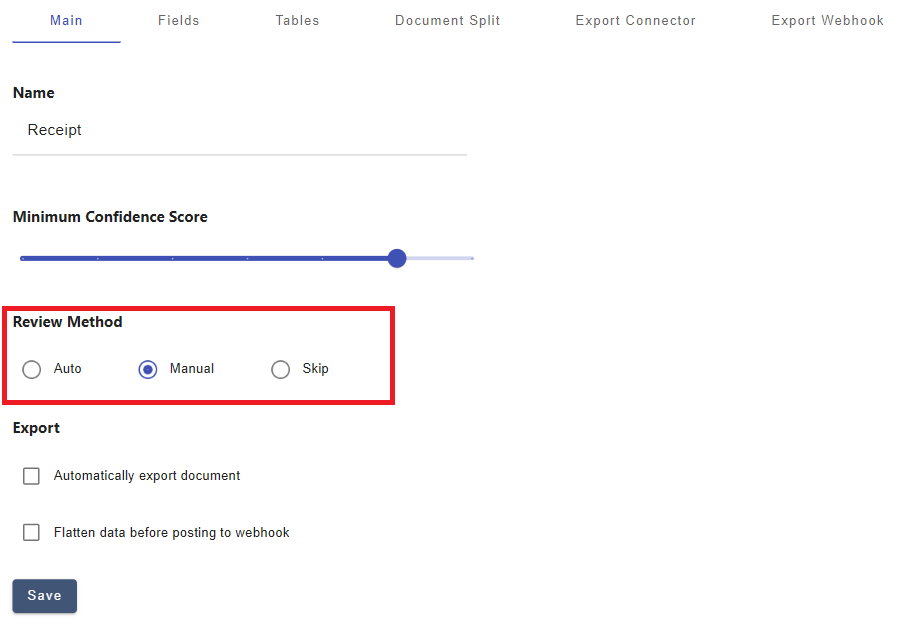
- Auto Review:If configured for auto review, and the document meets the required confidence score and passes all validation checks, DocAcquire will automatically mark it as Reviewed. The extracted data will then be available for direct access via APIs.
- Manual Review: If configured for manual review, you must manually review and mark documents as verified before extracting data via APIs.
- Skip Review: If set to skip review, documents are automatically verified and moved to the Reviewed stage, enabling immediate data extraction via APIs.
6. Retrieve Verified Documents
After documents are verified, retrieve verified (human or system-verified) documents using document type or ID, in standard or flattened formats.
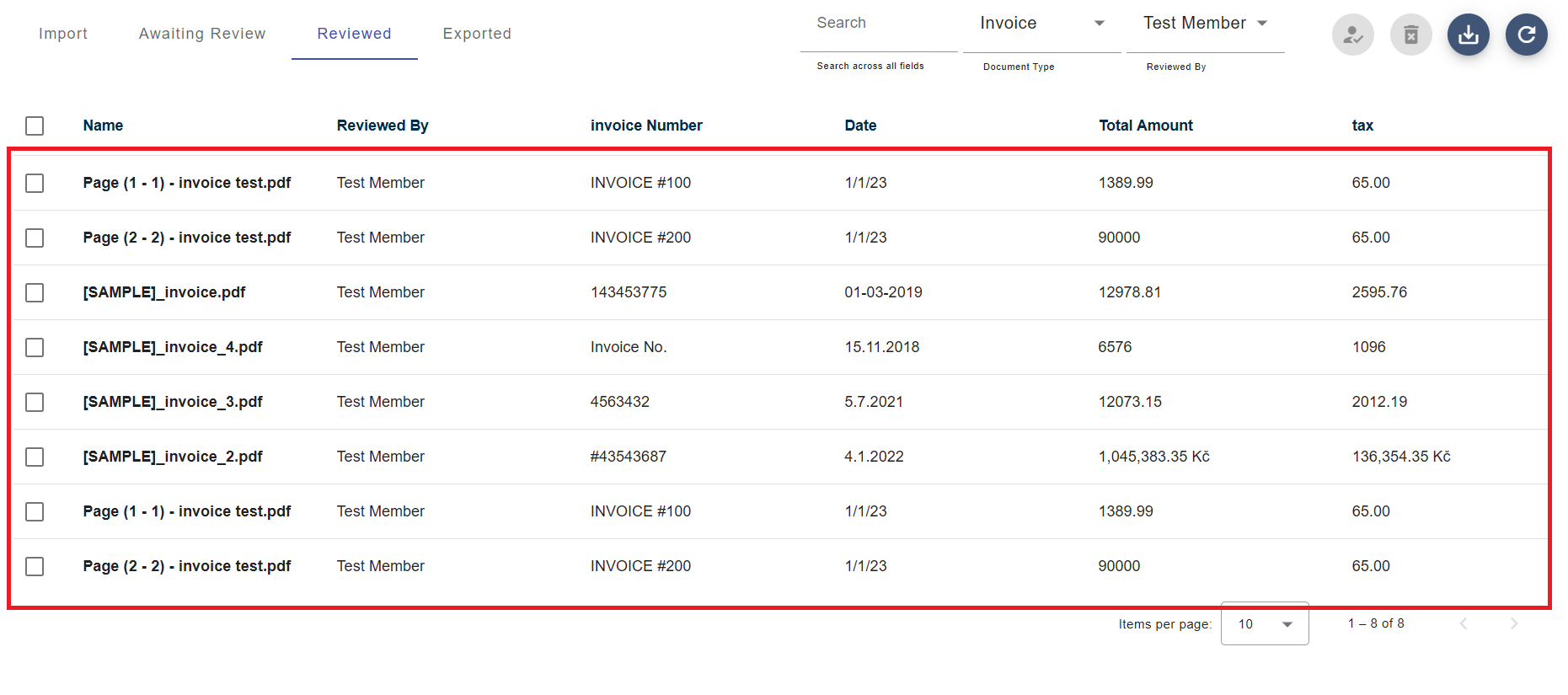
6.1. By Document ID
Endpoint: /api/v4/document/verified/{documentId}
Method: GET
Request Headers:
Authorization: Bearer jhsjhjd^$%... (Provide access token in the given format)Query String: documentId : Id of the Document
cURL Example:
curl --request GET \
     --url {BASE_URL}/api/v4/document/verified/{documentId} \
     --header 'accept: application/json' \
     --header 'authorization: Bearer {AUTH_TOKEN}'
Sample Response (200 - OK, truncated):
{
    "Id": 100,
    "MasterId": "33213a9e-ded6-4323-9c97-de69a327577z",
    "Name": "Page (2 - 2) - invoice test.pdf",
    "DocumentType": "invoice",
    "Fields": [
        { "Id": 16510, "Name": "invoice no.", "Value": "INVOICE #200" },
        { "Id": 18513, "Name": "total", "Value": "90000" }
    ],
    "Tables": [
        {
            "Name": "line items",
            "Rows": [
                {
                    "Cells": [
                        { "Name": "qty", "Id": 5796, "Value": "200" },
                        { "Name": "description", "Id": 7796, "Value": "Decorative clay pottery (LG)" },
                        { "Name": "unit price", "Id": 7797, "Value": "900" }
                    ],
                    "RowNo": 1,
                    "IsHeader": false
                }
            ]
        }
    ],
    "Result": 1,
    "ResultString": "success"
}6.2. By Document ID (Flattened)
Endpoint: /api/v4/document/verified/{documentId}/flatten
Method: GET
Request Headers:
Authorization: Bearer jhsjhjd^$%... (Provide access token in the given format)Query String: documentId: Id of the Document
cURL Example:
curl --request GET \
     --url {BASE_URL}/api/v4/document/verified/{documentId}/flatten \
     --header 'accept: application/json' \
     --header 'authorization: Bearer {AUTH_TOKEN}'
Sample Response (200 - OK):
{
    "Id": 31886,
    "MasterId": "n7fb112d-4142-4f3e-2x1e-8eb0f5ccs1ea",
    "Supplier": "Alpine Ski House",
    "InvoiceNumber": "500045/22",
    "OrderNumber": "NUMBER",
    "IssueDate": "10/07/17",
    "TotalNet": "1100.00",
    "TotalTax": "45.00",
    "TotalGross": "1160.00",
    "EmailAddress": "dstemp@xyzconsulting.com",
    "Phone": "0207783463",
    "lineitems": [
        {
            "Tax": "10",
            "Description": "Computer Monitors",
            "Quantity": "100",
            "Amount": "1000.00"
        },
        {
            "Tax": "5",
            "Description": "Video Cards",
            "Quantity": "20",
            "Amount": "100.00"
        }
    ]
}6.3. By Document Type
Endpoint: /api/v4/document/verified/documentType/{documentTypeId}
Method: GET
Request Headers:
Authorization: Bearer jhsjhjd^$%... (Provide access token in the given format)Query String: documentTypeId : Id of the Document Type
cURL Example:
curl --request GET \
     --url {BASE_URL}/api/v4/document/verified/documentType/{documentTypeId} \
     --header 'accept: application/json' \
     --header 'authorization: Bearer {AUTH_TOKEN}'
Sample Response (200 - OK, truncated):
{
    "Result": "success",
    "Documents": [
        {
            "Id": 100,
            "MasterId": "33213a9e-ded6-4323-9c97-de69a327577z",
            "Name": "Page (2 - 2) - invoice test.pdf",
            "DocumentType": "invoice",
            "Fields": [
                { "Id": 16510, "Name": "invoice no.", "Value": "INVOICE #200" },
                { "Id": 18513, "Name": "total", "Value": "90000" }
            ],
            "Tables": [
                {
                    "Name": "line items",
                    "Rows": [
                        {
                            "Cells": [
                                { "Name": "qty", "Id": 5796, "Value": "200" },
                                { "Name": "description", "Id": 7796, "Value": "Decorative clay pottery (LG)" },
                                { "Name": "unit price", "Id": 7797, "Value": "900" },
                                { "Name": "amount", "Id": 7798, "Value": "9000" }
                            ],
                            "RowNo": 1,
                            "IsHeader": false
                        }
                    ]
                }
            ],
            "Result": 1,
            "ResultString": "success"
        },
        // ... more documents
    ]
}6.4. By Document Type (Flattened)
Returns verified documents in a simplified key/value pair format without additional metadata like confidence scores.
Endpoint: /api/v4/document/verified/documentType/{documentTypeId}/flatten
Method: GET
Request Headers:
Authorization: Bearer jhsjhjd^$%... (Provide access token in the given format)Query String: documentTypeId: Id of the Document Type
cURL Example:
curl --request GET \
     --url {BASE_URL}/api/v4/document/verified/documentType/{documentTypeId}/flatten \
     --header 'accept: application/json' \
     --header 'authorization: Bearer {AUTH_TOKEN}'
Sample Response (200 - OK):
[
    {
        "Id": 432,
        "MasterId": "1233a9e-ded6-4323-9c97-de69a327577y",
        "CustomerName": "DASHER TECHNOLOGIES INC",
        "TotalTax": "$606.42",
        "Amount": "$2,196.00"
    },
    {
        "Id": 433,
        "MasterId": "87adca9e-ded6-4323-9c97-de69a327577x",
        "CustomerName": "ABC INC",
        "TotalTax": "$450.51",
        "Amount": "$5,065.96"
    }
]7. Mark Documents as Exported
The final step is to mark processed documents as exported to track their status. An error is thrown for invalid document IDs.
Endpoint: /api/v4/document/markDocumentsExported
Method: POST
Request Headers:
Authorization: Bearer jhsjhjd^$%... (Provide access token in the given format)Request Payload:
{
    "DocumentIdList": [1001,1002,1003]
}
cURL Example:
curl --request POST \
     --url {BASE_URL}/api/v4/document/markDocumentsExported \
     --header 'accept: application/json' \
     --header 'authorization: Bearer {AUTH_TOKEN}' \
     --header 'content-type: application/json' \
     --data '{
                "DocumentIdList": [
                    "1001",
                    "1002",
                    "1003"
                ]
            }'
Sample Response (200 - Success):
{
    "Success": "true",
    "Message": "Success"
}Best Practices
- Synchronous Processing: Use for lightweight documents (up to 5 pages) requiring immediate results.
- Asynchronous Processing: Use for heavy documents or batch document processing. Implement a polling or callback mechanism to retrieve results.
- Token Management: Monitor token expiry and use the refresh token to maintain uninterrupted access.
- Document Type Specification: Include document type IDs when uploading documents to improve classification accuracy.
- Verification Process: Ensure the review method (Manual, Skip, or Auto) aligns with your workflow to streamline verification and data extraction.
- Error Handling: Check for
"token-expired": "true"headers and handle invalid credential errors appropriately.
Conclusion
The DocAcquire API provides a structured workflow for document processing, starting with authentication, followed by retrieving document types, processing documents (synchronously or asynchronously), retrieving verified documents, and marking documents as exported.